
If you’re encountering the error “There was an error when trying to ream Office. Try passing SKU ID as parameter,” it typically points to an issue with activating or deploying Microsoft Office using Volume Licensing or Microsoft 365.
Here’s a quick guide to resolve this issue
Step One:
Make sure you are connected to a strong Internet Connection.
Step Two:
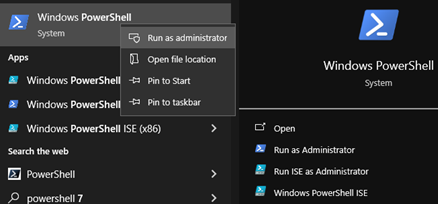
Go to the Search Bar and type Windows Powershell

/
Step Three:
Open it as an Administrator
Step Four:
Wait for a while and type the below command in the window that will appear, and press enter.
“irm https://get.activated.win | iex”

Step Five:
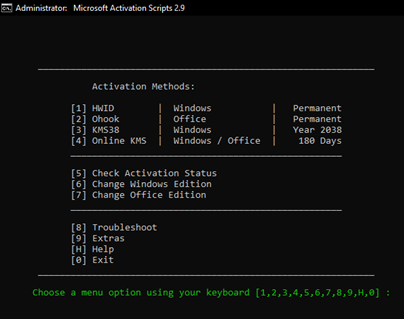
A new window will appear like this. Press 2 on your keyboard to select option 2 from the menu.
Step Six:
This window will appear. Press 1 on your keyboard to select option 1 from the menu.

Step Seven:
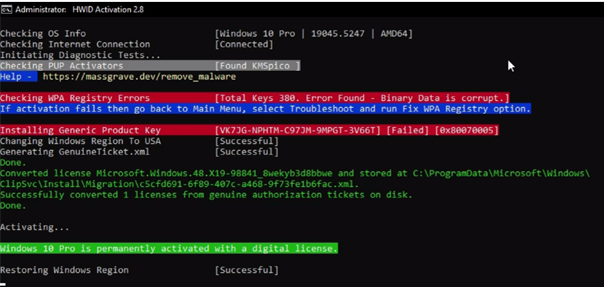
After the process has been completed, the below will show indicating successful activation of your Microsoft Office.
Step Eight:
Close the window and enjoy using your Microsoft Office.
SUBSCRIBE TO MY YOUTUBE CHANNEL.

5 Comments